Features
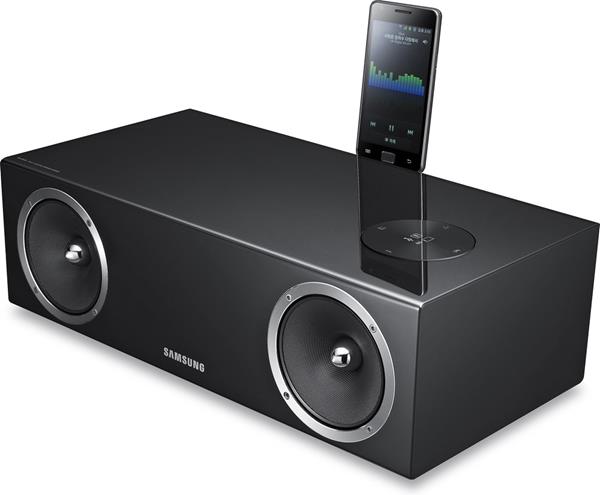
Overview: The Samsung DA-E670 Wireless Audio System features dual docks to connect your Apple or Samsung Galaxy mobile device. The DA-E670 also offers a network connection that lets you wirelessly stream music from both Apple and Samsung Galaxy mobile devices, as well as play stored content from a PC or laptop with AllShare & Airplay. Plus, you can stream CD quality music using Bluetooth 3.0 with aptX technology from any compatible Bluetooth enabled device.
40-Watt Amplifier: The Samsung DA-E670 Wireless Audio System with Dock is equipped with a 10W x 2ch + 20W x 1ch amplifier for dynamic, full-range sound. The two full-range drivers are driven by 10-watts each. The woofer is driven by a separate 20-watts.
Premium Glass-Fiber Speaker Design: The Samsung DA-E670 Wireless Audio System with Dock produces hi-fi sound quality thanks to its phase plug design and glass fiber material. The combination of these two features delivers improved sound depth and clarity.
Built-In Woofer: The DA-E670 employs a built-in, rear-firing woofer for a richer and increased bass sound. The woofer has been cleverly integrated inside of the cabinet to deliver a deep, rich sound without the bulky size or need to purchase additional components. The unit also features a “BASS” function which enhances the system’s bass performance even more.
Dual Docks: The Samsung DA-E670 Wireless Audio System features dual docks that allow you to connect your Apple or Samsung Galaxy device. The DA-E670’s dual docks support audio playback, basic control, and charging of your compatible Apple or Samsung Galaxy device. The dual dock is located on the rear-panel of the unit and can be hidden when not in use.
- Apple Dock: The 30-pin Apple dock supports the Apple iPod classic (80/120/160GB), iPod nano (3rd/4th/5th/6th gen), iPod touch (1st/2nd/3rd/4th gen), iPhone (2G/3G/3GS/4/4S), and iPad (1/2).
- Samsung Galaxy Compatible: The 5-pin Samsung Galaxy dock supports the Samsung Galaxy S2, Galaxy S2-LTE, Galaxy Player, and Galaxy Note. In order to connect your compatible Samsung Galaxy device, you must first download the Samsung Docking Mode application from the Android Market onto the device. The app can support Gingerbread, Honeycomb, and Ice Cream Sandwich.
AllShare + AirPlay: The Samsung DA-E670 Wireless Audio System with Dock features a rear-panel Ethernet (RJ-45) port and built-in WiFi (802.11b/g/n) to connect the system to your home’s network. By connecting the DA-E670 to your network, you can now access your entire iTunes music library via AirPlay or all the stored music files on your computer via AllShare (DLNA).
- AllShare (DLNA): Samsung’s AllShare function, along with its DLNA Certification, allows you to listen to music (MP3/WMA) saved on your Windows PC (or other DLNA Certified media server) through the DA-E670 via its Ethernet port or built-in WiFi. This eliminates the need to copy your photo, video, and music files to a separate USB storage device. Windows PCs with XP and Vista installed require Samsung’s PC Share Manager software, which can be downloaded for free at www.samsung.com. (Windows 7 is already DLNA compliant). Not compatible with older Windows OS versions and Mac.
- AirPlay: AirPlay lets you stream your favorite songs directly from your iPod touch (3rd/4th), iPhone (3GS/4/4S), and iPad (1/2), or from your iTunes library on your PC or Mac to the Samsung DA-E670, over your home network connection. By downloading Apple’s free “Remote” application onto your iPod touch, iPhone, or iPad you don’t even need to be in the same room as the DA-E670 or your computer to play, pause, skip, and stop the songs in your iTunes music library. To use the AirPlay feature you need a Mac or Windows-based PC running iTunes (10.1 or later) connected to your wireless home network. Your iPod touch, iPhone, and iPad must have iOS 5.0 or later installed and connected to the same wireless home network.
Bluetooth 3.0 w/ AptX: The Samsung DA-E670 features built-in Bluetooth 3.0 with aptX technology. The unit’s built-in Bluetooth lets you stream audio from your Bluetooth-enabled smartphone, audio player, tablet, computer, or 2012 Samsung TV to the DA-E670. Thanks to aptX technology your wireless music will sound “CD-like” (when streaming from an aptX equipped Bluetooth device). The Samsung DA-E670 only supports the streaming of audio (A2DP), and does not support control over your Bluetooth device. You will continue to control playback functions from your Bluetooth-enabled device. You can only pair one device at a time to the DA-E670.
Note: Due to the differences in Bluetooth technology, some Bluetooth enabled devices may be incompatible, function improperly, or may not support all features when used with the Samsung DA-E670.
USB Port: The Samsung DA-E670 Wireless Audio System is equipped with a rear-panel USB (type-A) port for connection of an external USB mass storage class device; such as a USB thumbdrive, digital audio player, or smartphone. The Samsung DA-E670 supports playback of MP3 (80-320kbps; 44.1kHz)/WMA (56-128kbps; 44.1kHz) music files from a compatible USB memory device formatted in FAT16/32. The DA-E670 will also charge (5V/500mA) the battery of your connected USB device.
Note: External HDDs, multi-card readers, and USB hubs are not supported. DRM-protected music files cannot be played. Not compatible NTFS file system or PTP protocols.
Firmware Updates: Firmware updates can be downloaded onto a USB thumbdrive from Samsung’s Support Site. The thumbdrive can then be inserted into the DA-E670’s USB port to update the unit’s firmware.
3.5mm Aux Input: The Samsung DA-E670 also includes a 3.5mm auxiliary input for connection of any portable audio player which features a 3.5mm headphone output.
IR Remote Control: The Samsung DA-E670 Wireless Audio System with Dock includes an IR remote control for wireless operation of the speaker system and your connected Apple or Samsung Galaxy device. The remote only offers basic playback control over your connected Apple or Samsung Galaxy device. Playback functions include Play/Pause and Next/Previous Track.




Reviews
There are no reviews yet.